
From your first click to professional trade management
You plan the trade on the chart, enter with a risk percentage, manage it with automatic tools and review it in the journal. First a short path, then the panel simulators, then the full details — whenever you need them.
See it in one minute
Intro · 57 sFour timeframes. One test clock. No peeking.
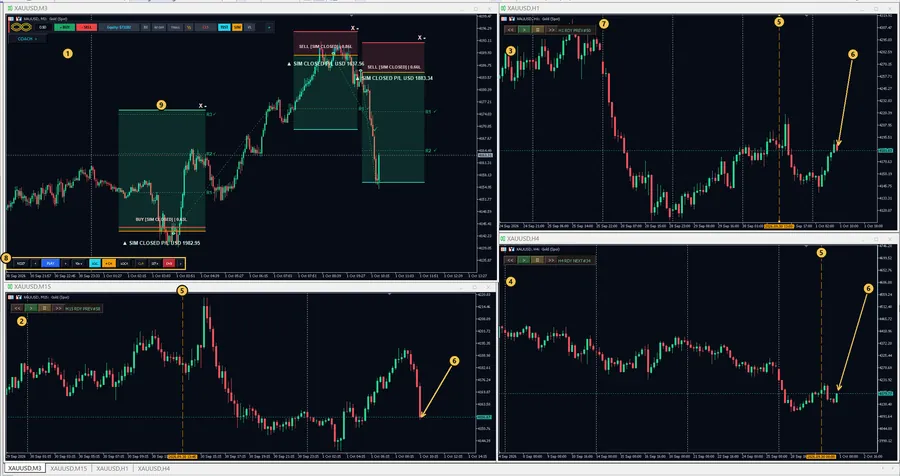
Replay any past period on your own MetaTrader charts: your trading timeframe plus M15, H1 and H4 of the same symbol, all moving together from one start point. A higher-timeframe candle appears only after it has really closed at the test time, and every trade you place is virtual.
- Trade the M5 entry while the H1 structure and H4 bias unfold beside it
- Play from 0.25x to 50x, step candle by candle, rewind, jump to a random start
- Test capital from $1,000 to $100,000, or your live balance
- Your live account is untouched; real trade arrows are hidden so they cannot hint at the outcome
Ask your trading history “what if?”
Filter the journal by session, symbol, side, weekday, hour or period. Every page recalculates for just that slice: net result, win rate, profit factor, expectancy, drawdown, equity curve, R statistics and Monte Carlo.
- What if I had traded only the Asia session?
- And only New York?
- How would XAUUSD alone have looked?
- BUY only? One weekday? One hour? The last 30 days?
The 6-step start path
Click any stepFour safety rules
If you read only one section, read this oneDaily routine
Simple map of the program
| Part | Main job | When do I use it? |
|---|---|---|
| Main panel / Zen | Create plans, orders, quick management | Before and during a trade |
| Trade Box | Entry, STOP, TP, risk and moving lines on the chart | While planning and managing |
| Guards / Coach | Daily limit, SL rules, behavior alerts and emotional pressure | Before every entry and at the end of the day |
| Workstation | News/time/prop guards, analytics, scanner | After you know the basics |
| Journal | Result, entry/exit screenshots, replay | After a trade |
| Strategy Lab / SIM | Practice and review without real orders | Learning and experiments |
Step-by-step start
From installation to your first Demo trade. Do every step on a Demo account.
Only one file is needed: MT4 → SMC_Trading_Cockpit_MT4.ex4 · MT5 → SMC_Trading_Cockpit_MT5.ex5. In the terminal: File ▸ Open Data Folder → MQL4\Experts (or MQL5\Experts) → copy → right-click in Navigator and Refresh. (In MT5 the hotkey relay is already embedded in the EX5; no other file is needed.)
Drag the EA onto a chart, tick Allow Algo Trading and turn on the terminal AutoTrading button. The main panel (or the small Zen bar) appears.
On the first run for each account (RunSetupWizard=1) a wizard opens: trading style (Prop / Gold-Scalper / Forex Swing), prop-firm rules and risk per trade. Nothing changes until CONFIRM & LAUNCH; you can SKIP. Each style sets these values: PROP FIRM — risk 0.5%, DAY 4%, account open-risk cap 2% and positions 1.5%, BE 0.25 ATR, Prop and News guards on BLOCK · GOLD / SCALPER — risk 1%, slippage 30, BE 0.25 ATR after TP1, Trail 1.5 ATR after TP2 · FOREX SWING — risk 1.5%, DAY 5%, BE 0.35 ATR, no trailing.
ManagementScope=0 (safe default) means only this EA’s own trades. The value 2 also manages every order on the symbol, including manual trades and other EAs; use it only knowingly.
In the RISK ▸ ACCOUNT GUARD tab set DAY %. The default 0 = OFF; without it, the daily-limit lock and the SL-widening policy do not work. Details: the “Guards” section.
With + BUY or - SELL you create a NEW PLAN (no order is sent). Drag Entry/SL/TP on the chart; the lot size is calculated from RISK (default 1.0%; the mode button switches to fixed money or fixed lots) and the SL distance. The MKT / PEND button sets the entry type. Every new Draft has only TP1 (100%) and SL1 enabled; turn on TP2…TP4 yourself.
When the Draft of the same side is active the button becomes EXEC BUY / EXEC SELL; the next click (or SET >) passes through the guards and sends the order. If it is refused, the “entry blocked” window tells you the reason and the next step.
On the Trade Box or the MANAGE tab: BE, TRAIL, RF and ½ (50%). (BE/TRAIL/RF are OFF by default.) Hide the box with - (the trade stays) and close with X (two steps).
After the trade closes: LAB ▸ JOURNAL (or the J key). Entry/exit screenshots, statistics and the REPLAY button; and Coach alerts on the TODAY page.
First-run checklist
First trade and practice
Plan → adjust → execute. First practice with the risk calculator and the button simulator; then on a real Demo.
Risk calculator
Drag the lines with the mouseHow does the BUY/SELL button work?
Three steps; try it hereYour first trade on Demo
If the program does not allow entry
Instead of switching BYPASS on, read the “entry blocked” window at the bottom of the chart: the category (trade permission, margin, daily loss/prop, size/risk, SL, R:R, spread, news/time, discipline, engine lock, license…), the exact reason and the next step. Its simulator is in “Extra panels ▸ Entry Block”.
If SIM does not open the trade
Read the message “VIRTUAL order NOT opened”. Causes: Recovery blocked, the engine lock is not on this chart, or the virtual book is held by another chart/instance (Lease). Check the Experts log for [RC34] and [RC35] and do not run two EAs on the same virtual book.
Suggested learning order
- Draw a Draft without executing and move Entry/STOP/TP.
- Open and close a sample order in SIM and watch its effect in Coach (SIM tag).
- Review decisions in Strategy Lab with PLAY/STEP/REWIND.
- On a real Demo, execute one small order and match the broker ticket with the box.
- Decide about a real account only after checking the behavior on your own symbol and broker.
Main panel
Six tabs from left to right: PLAN → MANAGE → RISK → MARKET → LAB → SYSTEM. Click any button or field; its explanation opens in the Inspector on the right.

+ BUY / - SELL only create a NEW PLAN when you have no Draft; if the Draft is on the opposite side they only change its direction; only when the Draft of the same side is already active does the text become EXEC BUY / EXEC SELL and the next click enters the real execution / Preflight path. SET > on the Draft calls the same central EXEC path.Trade Box on the chart
Every trade (Draft, Pending, open, even closed) has a box. Switch between the three states below and click the box buttons.
Besides the Quick Bar, the selected box shows R guides based on the initial risk. Reached R lines are stronger with a green/bold label, and a separate tick follows the label on the right.
The real rail with an order-type selector + SET > is 78×20. SET > calls the central EXEC path and Safety Preflight and in Live can send a real order. The Draft also shows R guides based on the initial Entry/SL.
Since V40.214 the non-selected box is no longer just Entry/SL/TP: the TP1…TP4 ladder remains, R guides are shown, and the BE / TRAIL (LINE) line is visible as long as management work remains. SL stages are still editor-only.
Trade management
Scaled exits, Break-Even, Trailing, Risk-Free and changing STOP. Most work is done on the Trade Box itself.
ManualStopWideningPolicy: 0 warn · 1 up to the day budget · 2 forbidden. Without an active DAY %, policy 1 has no lock.Management tools
BE / Trail / RF are OFF by default| Tool | What it does | Note |
|---|---|---|
| TP1…TP4 | Scaled exit with a share and distance for each stage | A new Draft has only TP1 (100%); check the sum of the shares |
| SL stages | Stop-loss stages | Some edits are only possible when the box is selected |
| BE | Moves SL to breakeven; unit PIPS or ATR, NET mode also includes costs | Wizard value: 0.25 ATR after TP1 |
| TRAIL | SL follows price with a distance and step | On the box it is only on/off; starts from the START line or after TP; scalper wizard: 1.5 ATR |
| RF Risk-Free | After a condition (e.g. TP1) it brings the risk to zero | RF NOW is immediate and needs a valid SL and broker acceptance |
| ½ / 50% | Really closes 50% of the volume | H key: ARM then Enter within 5 seconds |
| CLS | Closes everything with a second confirmation | Depends on ManagementScope |
Scenarios
Zen HUD (small bar)
Switch between the full panel and Zen with the - key. BUY/SELL here has exactly the same three-step logic as the full panel. Press BUY or SELL to see the state.
Zen buttons from left to right
Real width 715px| Control | Job |
|---|---|
| 1.00 | Size/risk value (% or money or lots, depending on the active mode) |
| + BUY / - SELL | Create Draft → EXEC (same logic as the full panel) |
| Equity $… / P/L | Display only: floating P/L and R of live trades; with no position, account Equity. When the prop guard reaches 80% of the daily limit it shows “!” and turns amber |
| BE · RF · TRAIL | Turns automatic management on/off (for the selected ticket; with no selection = default for new trades). TRAIL on shows “TRL ON” |
| ½ | Close 50% of the trade (real; H key) |
| CLS | Close all; first click CONFIRM, second click within 4 seconds |
| TEST | Open/close Strategy Tester & Replay Lab |
| SIM | Virtual simulator on/off; while it is on, no real order is sent |
| N / P1 / P2 / P3 RC83–RC96 | Trading profile. A click loads the next profile (N → P1 → P2 → P3 → N): risk value, TP/SL stages and %, BE, RF, TRAIL (since RC125 with the BE trigger and offset, RF trigger, Trail trigger and distance), 1-POS/MULTI, VL, stop in ATR multiples and target R:R. Shift+Click (or Ctrl+Click) saves the current setup into the active P1–P3. N is fixed: Shift+Click while N is active saves nothing and shows “N is fixed” (since RC125; it used to overwrite P1). Profiles are stored in terminal global variables and shared by all symbols. Colors: N dark, P1 cyan, P2 amber, P3 green. In the simulator above, click the profile button to cycle and Shift+Click to see the save rule. |
| ⚡ RC103–RC133 | Fast Scalp market entry (also key F in Live, Strategy Lab and the tester; keys need WSEnableSafeHotkeys). Draws one full-width SL line (drag it; lot size follows your risk) and three buttons next to the price scale: BUY | lots (execute), RR (P1 → P2 → P3 → N → 1:1 → 1:1.5 → 1:2 → 1:3) and X (cancel). Execute with the BUY/SELL | lots button; Space/Enter execute only when WSEnableTradeHotkey = true and pressed twice within 2 s. Esc/F cancel. Dragging the SL across price flips the side. One single order is sent; profile mode adds its TP/SL stages to the position box, with profile TP values in the plan unit (ATR, pips or R). Afterwards your own PLAN (TP/SL stages, BE/RF/Trail, PEND/MKT) is restored (RC125). |
| + | Restore the full panel |
+ BUY / - SELL arm STANDBY (CLICK CHART); the next click on the chart places the box at that price (no order). Clicking the same button again or Esc cancels. Clicking the opposite side only changes the Draft direction. When a Draft of the same side is active, the text becomes EXEC BUY / EXEC SELL and the next click goes through PlaceRiskOrderForSide(). In SIM/Tester execution stays virtual.⚡ Fast Scalp on the chart
Simulator · RC133 behaviour · no order is sentRisk guards
Three layers: SL/TP move rules, account limits and Workstation guards. Defaults are mild; set them for your own real and prop account.
A) SL/TP move rules
ManualStopWideningPolicy | Behavior |
|---|---|
| 0 | Warning only |
| 1 (default) | Widening is allowed as long as the SL risk does not exceed the daily loss limit (and the remaining day budget) |
| 2 | Any widening of the SL of an open position is forbidden (no daily limit needed) |
DAY % (Account Guard) or Prop Guardian is zero (and the default DAY % is zero), the lock effectively does not work and Coach warns “daily loss limit is not set”.B) Account limits RISK tab
| Control | Meaning |
|---|---|
CAP (basis button) | Basis for risk calculation: Balance / Equity / Free margin (default Equity) |
MAX | Maximum number of managed positions (default 12) |
POS % | Cap on the total open risk of managed positions (default 5.0%) |
ACCT % | Cap on the open risk of the whole account (default 0 = OFF) |
PURE / +SLIP | Risk calculated without / with a slippage reserve (default PURE) |
DAY % + MNG/ACCT | Daily loss limit (default 0 = OFF). MNG = managed trades only, ACCT = whole account — the basis of many rules |
MARGIN | Margin usage cap % (default 80) |
COOL | Entry pause in seconds (0 = OFF) — anti double-click / overtrading |
MAX/DAY | Cap on new entries per day (0 = OFF) |
SPRD (mode) | Spread guard: OFF / WARN / BLOCK (default WARN) |
MAX SPRD · X AVG | Maximum spread in pips (0 = automatic) or a multiple of the average (default 2.5) |
SLIP · COMM | Allowed slippage in points (default 20) and estimated commission per lot |
| GUARDS ON / BYPASS | BYPASS button: sets the soft entry guards and the SL/TP move rules aside for at most 20 minutes (auto-off, also off after a restart). Prop Guardian, the daily loss limit (DAY %) and the current-price rule for open SL/TP are never bypassed (RC101/RC133) |
C) Prop Guardian simple prop guard
| Input | Default | Job |
|---|---|---|
PropFirmDailyGuard | false | Turn on the daily drawdown guard |
PropMaxDailyLossPct | 4.5 | Daily Equity drawdown cap (%) |
PropAutoCloseOnBreach | false | When the limit is breached, close all positions |
PropFirmFloatingGuard · PropMaxFloatingLossPct · PropFloatingAutoClose | false · 2.5 · false | Floating-loss guard and automatic close |
D) Workstation guards OFF / WARN / BLOCK
| Guard | Main input | What it does |
|---|---|---|
| News | WSNewsGuardMode | Blocks entries before/after important news (30 minutes before, 15 after, High impact). If the news feed fails: WSNewsFeedFailurePolicy. |
| Schedule | WSScheduleGuardMode | Allowed trading days/hours/sessions (default: Monday to Friday, all sessions) |
| Prop Rules | WSPropGuardMode | Full rule engine for FTMO / FundedNext / The5ers: daily/overall drawdown, profit target, minimum days, lot cap, no overnight/weekend holding, Auto-flatten. Choose the template with WSPropPreset. |
| Discipline | WSMaxConsecutiveLosses · WSLossCooldownMinutes | Consecutive-loss cap, pause after a loss, daily profit lock, trades-per-session cap, risk reduction in drawdown. Hard Gate: once triggered it is always Block. |
| Time | WSTimeManagementEnabled | Maximum holding time, close at session end/Friday, Time-Stop, time-based BE |
E) Risk at a glance Coach › TODAY
CoachMaxRiskPerTradePct (1%); twice the limit = red.Workstation
Open: LAB ▸ WORKSTATION or the W key. The status bar on top shows which guards (affect trading) and which tools (analysis only) are on.
Journal and Replay
Open: LAB ▸ JOURNAL or the J key. A large window for whole-account analysis with a filter bar on top and five groups: DASHBOARD · PERFORMANCE · RISK · REVIEW · COACH. The numbers are demo samples.
Ask your journal “what if?”
The filter bar at the top of the Journal is the most powerful part of it. Pick a filter and every page recalculates for exactly that slice of your closed trades: dashboard KPIs and equity curve, performance charts and the time heat map, symbol and distribution pages, risk and Monte Carlo, calendar, the trade list, Review, Behavior and the CSV export.
The filters
| Filter | Choices | Question it answers |
|---|---|---|
| RANGE | 7D · 30D · 90D · YTD · ALL | Is my recent form different from my history? |
| SYMBOL | every symbol you traded | How would XAUUSD alone (or EURUSD alone…) have turned out? |
| SESSION | ASIA · LONDON · OVERLAP · NEW YORK · OTHER | What if I had traded only Asia? Only New York? (session hours are inputs, broker server time) |
| DOW | Monday … Friday | Does one weekday drag my results down? |
| HOUR | each hour of the day | Which hour makes or loses money? |
| SIDE | BUY · SELL | Am I better at longs or shorts? |
| RESULT | wins · losses · breakeven | What do my losing trades have in common? |
| < DATES > | step through single days | What exactly happened on that day? |
| NO FILTERS | reset | Back to the whole history for comparison. |
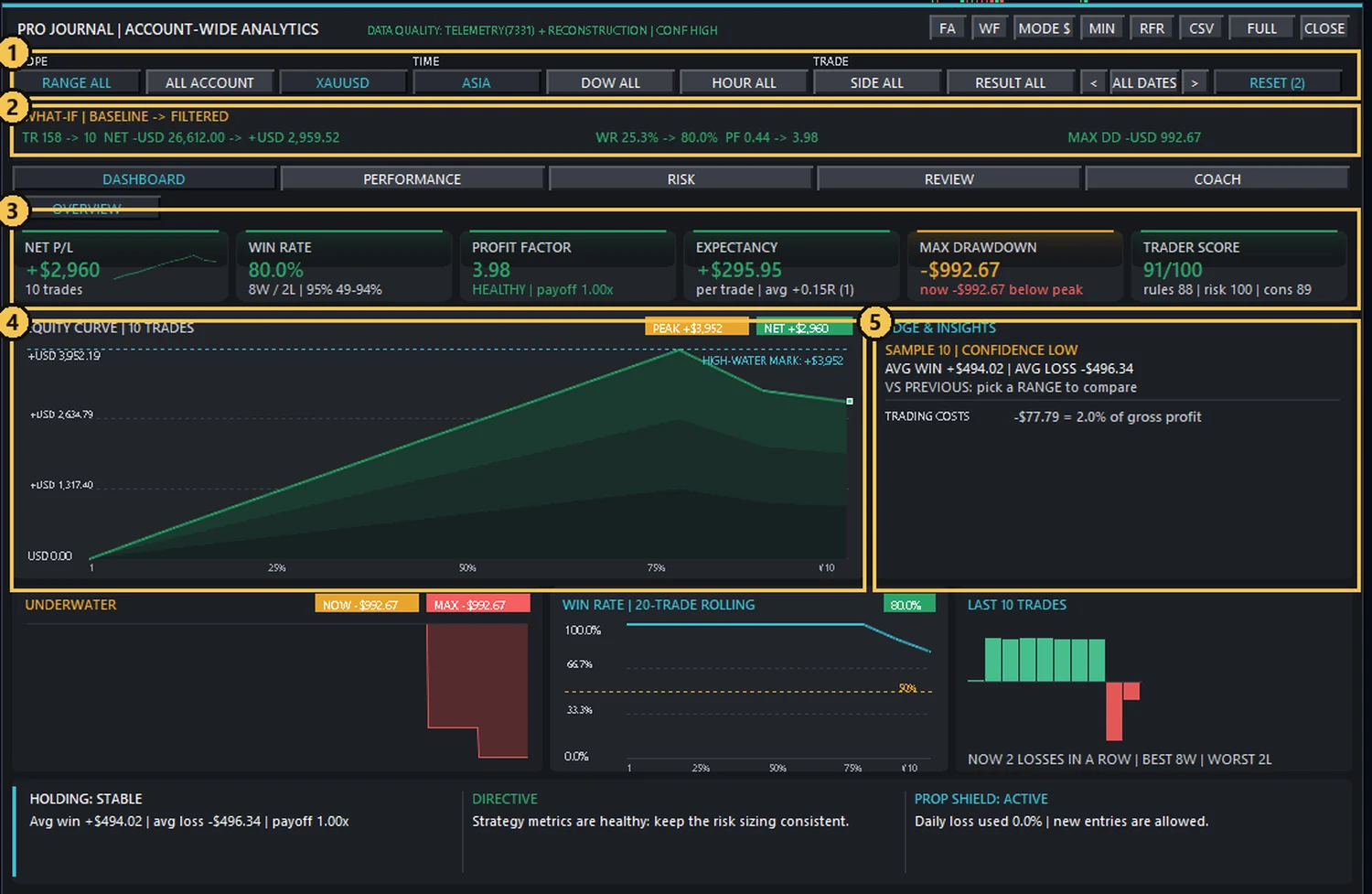
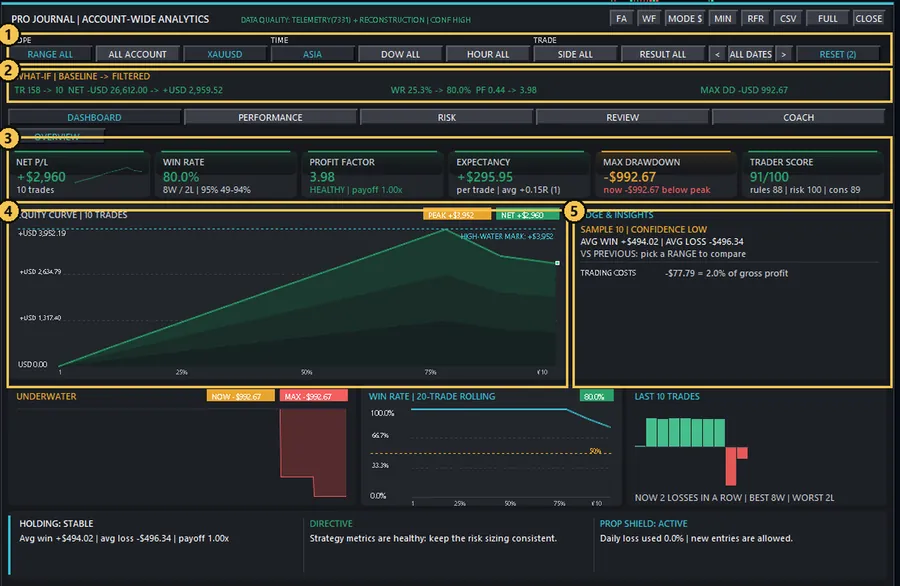
- 1Filters: RANGE, ALL ACCOUNT, SYMBOL, SESSION, DOW, HOUR, SIDE, RESULT, DATES
- 2WHAT-IF bar: trades, net result, win rate, profit factor and max drawdown before and after the filter
- 3Every KPI recalculates for that slice: net P/L, win rate, PF, expectancy, drawdown, trader score
- 4Equity curve and charts of the filtered trades only
- 5Edge & insights with a confidence note (small samples are flagged)
How to answer a “what if” in four steps
Example: Asia shows a positive expectancy but New York does not? Then your edge is in Asia, and the Review and Behavior pages tell you what went wrong in the other slice.
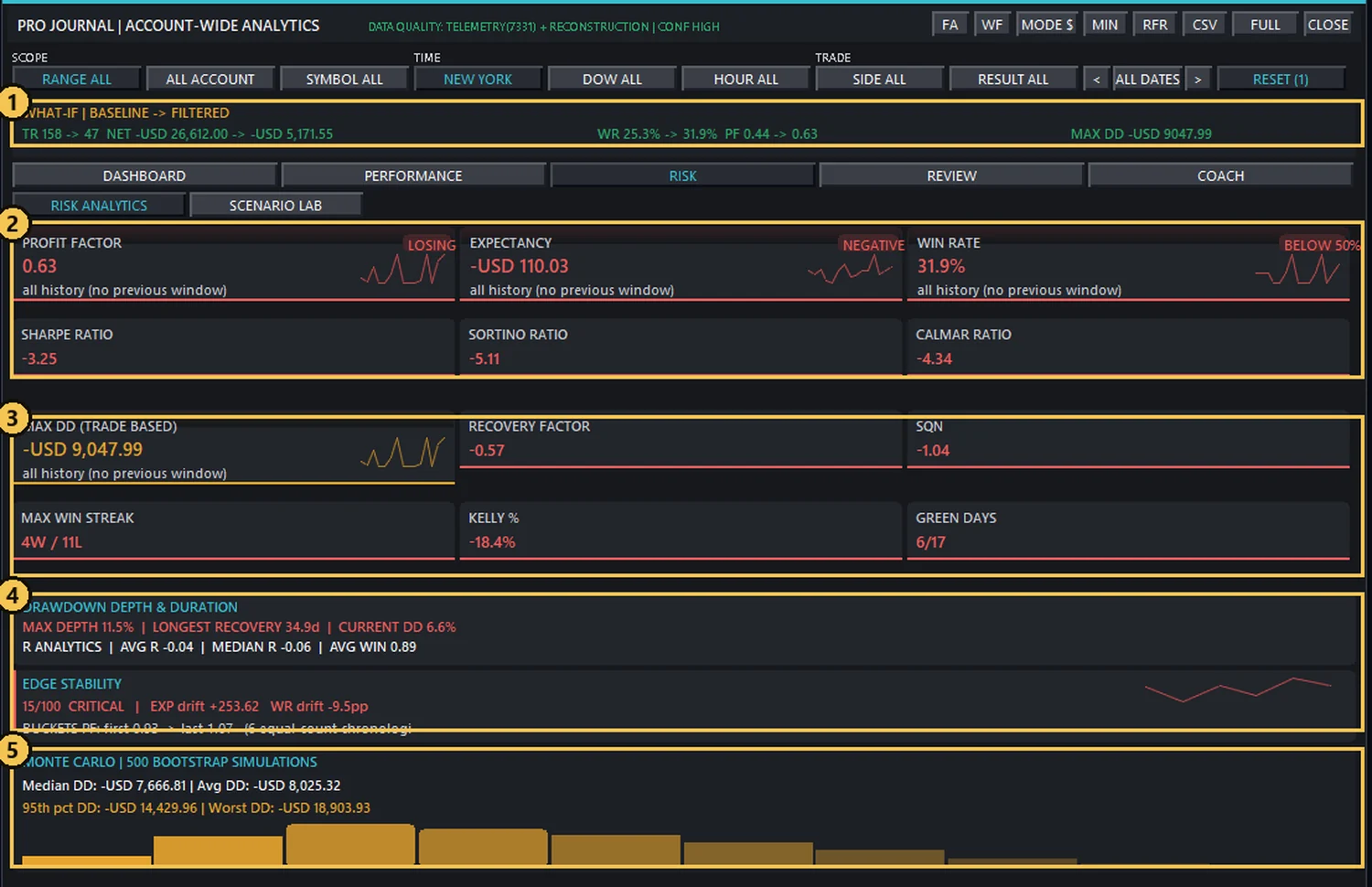
- 1WHAT-IF bar for the New York session: 158 trades before, 47 after the filter
- 2Profit factor, expectancy and win rate with a status tag (LOSING / NEGATIVE / BELOW 50%)
- 3Sharpe, Sortino, Calmar, max drawdown, recovery factor, SQN, Kelly, streaks
- 4Drawdown depth and duration, R analytics and edge stability across 6 time buckets
- 5Monte Carlo: 500 bootstrap simulations of the filtered trades
Scenario Lab: what if costs, size or win rate change?
Under RISK ▸ SCENARIO LAB you re-play the currently filtered closed trades with your own assumptions: spread multiplier, commission, win-rate decay % and risk scale. RUN SCENARIO (needs 5+ closed trades) shows baseline net → scenario net, PF, win rate and expectancy, plus a 400-run Monte Carlo: median drawdown, 95th-percentile drawdown and risk of ruin (10% drawdown). It never changes your account, and the results are estimates, not promises.
And around it
Explore the Pro Journal, one tab at a time
Choose a group and tab: the detailed panel below switches to that view and practical guidance updates alongside it. All numbers shown are illustrative.
1. Choose a Journal group
2. Open a tab
Trade evidence & screenshots — actual capture
This is a real RC58 evidence window. ENTRY SHOT is selected in this capture; no EXIT SHOT or MANUAL SHOT content was supplied.
3. Interactive visual for the selected tab
Use “Expand journal view” for a larger canvas. On mobile, scroll the preview horizontally. · All values and charts are illustrative—not linked to your trading account.
BEHAVIORAL COACH
RULE FOLLOWING 82%
SIZE CONTROL STABLE
2 REVENGE FLAGS
Review losing London trades
filters apply | grey = fewer than JournalMinSample trades
R ANALYTICS | AVG R +0.62 | MEDIAN R +0.41 | AVG WIN +1.44R | AVG LOSS -0.78R | WORST -1.12R | R TRADES 112/128
SCENARIO PF 1.31 | WR 53.2% | EXP +$24.57 per trade
MONTE-CARLO (400 iterations, WR-decay flips + bootstrap)
Median DD -$870 | 95th pct DD -$1,690 | Risk-of-ruin(10% DD) 6.2%
Model: net × risk − costs; winners flip to avg loss (P=decay)Spacing between losses shortened after drawdown. Review entry gate before the next trade.
Most trades kept initial risk boundaries; 2 stop-widen events require review.
STRENGTHS
• Consistent position sizing
• Strong London-session edge
WEAKNESSES
• Early exit after +1R
• Performance drops after 3 losses
ACTIVE COACH RECOMMENDATIONS
1. After 2 losses, reduce pace and re-check setup.
2. Let A-grade trades reach planned management milestone.
3. Avoid OTHER session until sample improves.
Replay Bar · 520×30
Exact size and order of the buttonsHotkeys and dispatch priority
ClickCoach V2 · behavior coach
A read-only advisor: it never sends or changes an order. LIVE and SIM are analyzed separately. Only configurable guards can block entries. With CoachUiV2=false the old view returns.
C2L dictionary and the smc_p53_i18n.inc translation layer; the FA button inside the dock works too.| 7D | PREV 7D | DELTA | |
|---|---|---|---|
| Trades | 31 | 27 | |
| Win rate | 58% | 52% | g |
| Net | +412.60 | +118.20 | g |
| Avg R | 0.42 | 0.18 | g |
| Profit factor | 1.61 | 1.22 | g |
Emotional pressure (Tilt) ⓘ
0–100 · 60+ = restThe calculator below is a teaching example of the Coach V2 formula; it is not connected to a MetaTrader account. The software itself computes these inputs from history and account state.
Configurable gates and alerts
CoachMaxRiskPerTradePct = 1.0
Warns when one trade’s risk is above 1% of the balance.
CoachRevengeWindowMin = 30
A 30-minute window for detecting revenge entries; by default only the same symbol and no scale-in.
CoachMaxTradesPerDay = 0
0 means the daily trade cap is disabled; a positive value enables the entry guard.
ToastLanguage = 2
When an entry is rejected, the reason and next action are shown in two languages.
UiLanguage; digits are always Latin. Dock width: CoachPanelWidth (460–600). The “entry blocked” window: ToastLanguage · ToastSeconds · ToastFontSize.Extra panels
Panels that appear depending on account and chart state. Switch between them with the bar below.
ToastLanguage. Activity, Quick Setup, Equity, Prop HUD and Lab are always English.0.5% risk / trade
Firm guard + live limits
News block + auto-lock
1.0% risk / trade
ATR break-even + trail
30 pt slippage tolerance
1.5% risk / trade
Wide exits / no trailing
Daily loss cap 5%
Best day 1260 | auto-lock BLOCK
• No discipline alerts. Stick to the plan.
RC37SyncToast(): ToastLanguage=1 shows Persian only, =0 English only, =2 both blocks one below the other. The reason translation comes from the same ~1200-phrase dictionary; if a reason has no translation, the English text stays.MINDSET: CALM / VERIFIED
RULES: PRE-TRADE CHECKLIST VERIFIED
RISK: WITHIN ACCOUNT AND POSITION LIMITS
BAL 10042.60
FLT +184.20
EQ 10226.80
POS 2 VOL 0.40
PEND 1 LED 8
REAL +612.40
Strategy Lab (4-chart tester)
Multi-timeframe Replay on a live chart with a future mask: candles after the test time are covered. Trades here are virtual. Select charts and try the buttons.
Multi-timeframe Strategy Lab: how it works
Most manual traders decide top-down: the higher timeframe gives the bias, the middle one the structure, the lower one the trigger. Strategy Lab lets you practice exactly that on history, inside your own MetaTrader, with every chart advancing on the same clock.
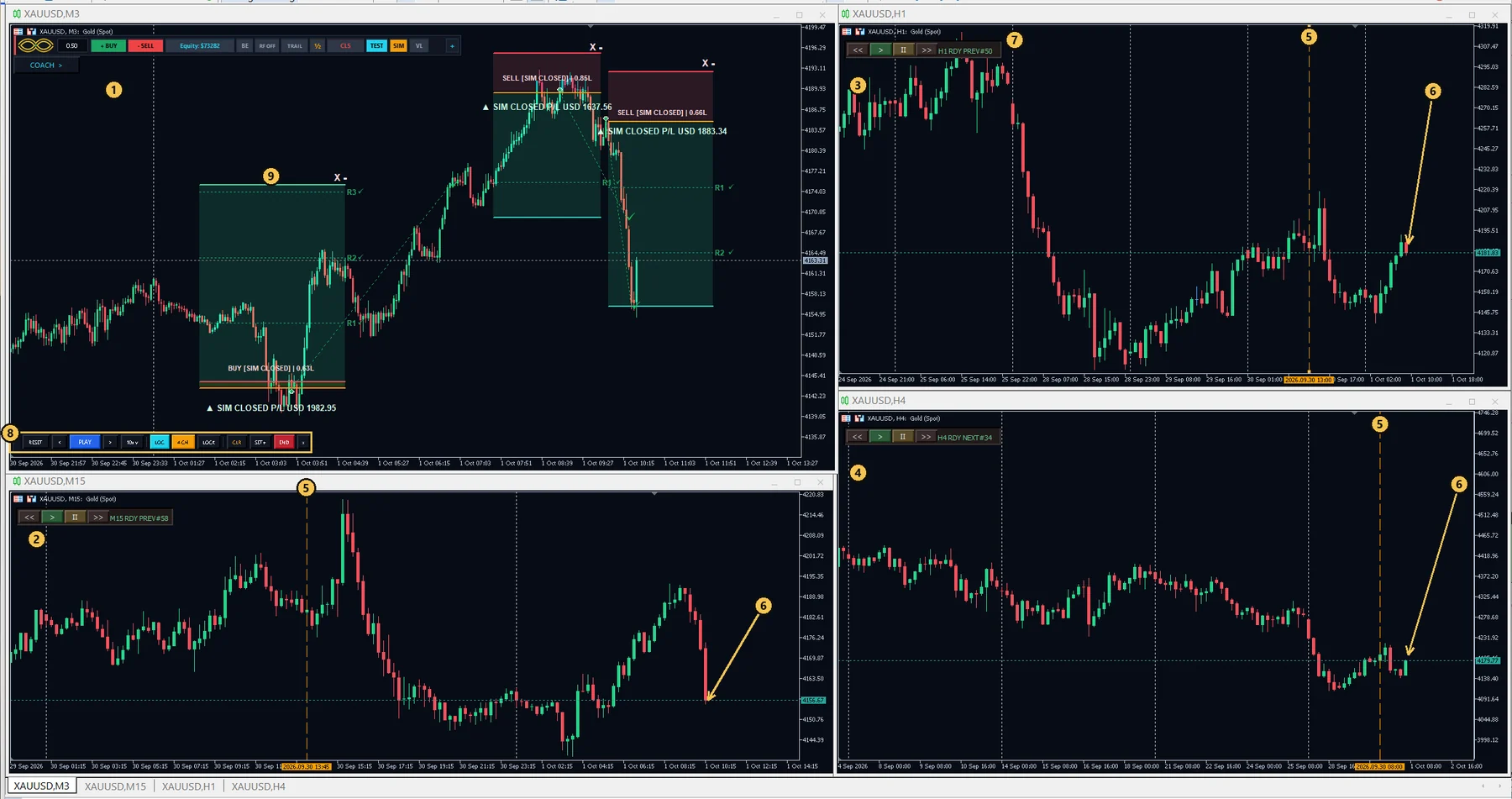
- 1MAIN chart (your timeframe, here M3): plan, execute and manage trades
- 2M15 chart: trigger / context (opens automatically)
- 3H1 chart: structure (opens automatically)
- 4H4 chart: bias (opens automatically)
- 5Start line on each chart: drag it, or use SET START / RANDOM
- 6Test time: every chart ends at the same moment, the future is hidden
- 7Mini controller on each side chart: step that chart's own candle
- 8Lab bar: RESET, PLAY, speed, LOC, 4 CH, AUTO/LOCK, CLR, SET+, END
- 9Virtual (SIM) trades: normal trade box, R levels and P/L
The four charts
Press 1 CH → 4 CH and the three side charts of the same symbol open next to your main chart. You may change a side chart's timeframe; the Lab follows whatever timeframe each chart actually shows.
One clock, no peeking
How a higher-timeframe candle appears. The clock steps in the finest timeframe of the open charts (M5 here). An H1 candle stays hidden while it is still forming and becomes visible only when it has completed at the test time. Illustration of the rule, not a screenshot.
A top-down practice session
The Lab bar
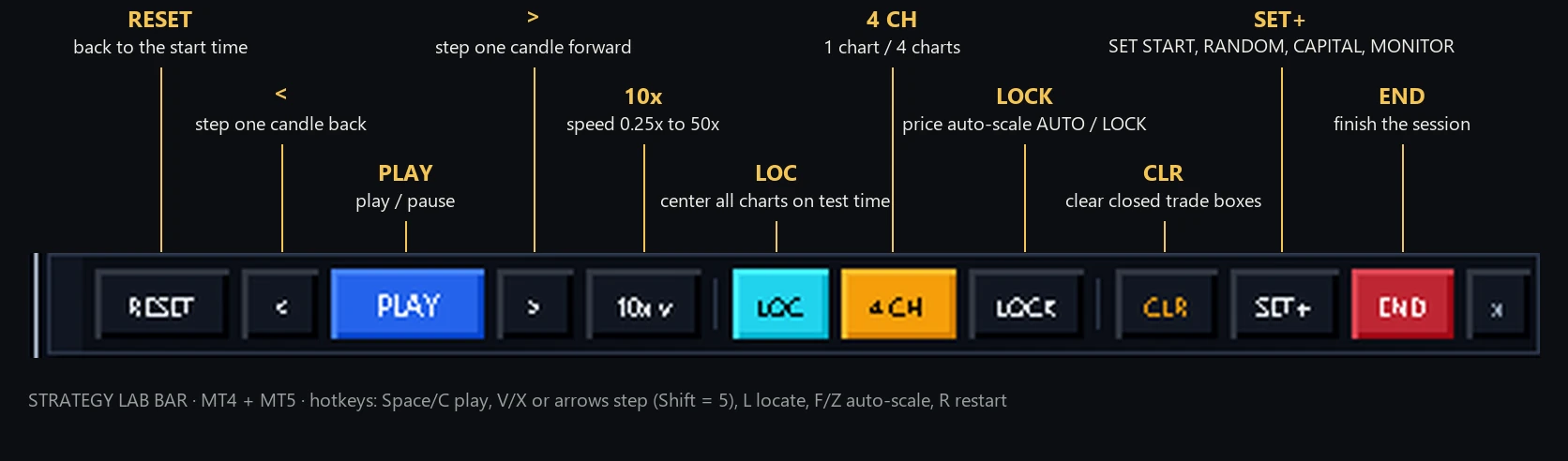
| Control | What it does |
|---|---|
| START / RESET | Start the replay session; RESET returns to the start time (R). |
| < PLAY / PAUSE > | Step back or forward one candle (X/V or arrow keys, Shift = 5 candles); play and pause with Space or C. |
| SPEED | 0.25x · 0.5x · 1x · 2x · 5x · 10x · 20x · 50x. |
| LOC | Center all charts on the test time (L). While paused you may scroll and zoom any chart freely; LOC brings them back. |
| 1 CH / 4 CH | One chart or the four-chart layout. |
| AUTO / LOCK | Dynamic price auto-scale on or off (F / Z). |
| SET+ | SET START (move the start to the cursor), RANDOM (random historical bar), CAPITAL (LIVE ACCOUNT or SIM $1,000 – $100,000) and MONITOR (Replay Monitor). |
| CLR · END | CLR clears closed trade boxes (two-step confirm); END finishes the session. |
From test to review
Press J during a Lab session and the Journal analyses your virtual trades with the same filters, charts and statistics as for real trades (data quality is marked VIRTUAL SIM). The Replay Monitor lists every closed test trade, and PLAY on any row replays it.
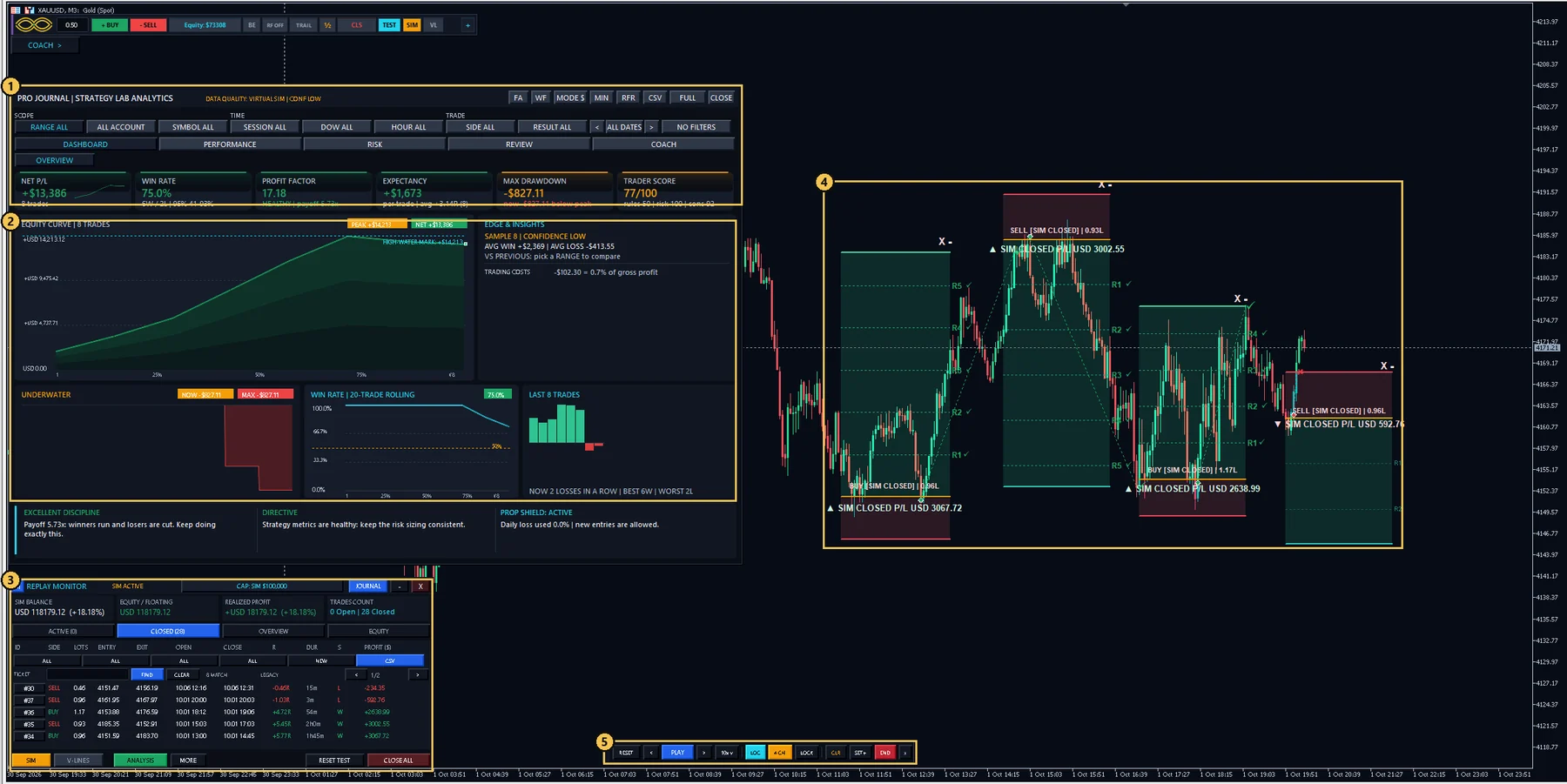
- 1Pro Journal opened on top of the Strategy Lab: same filters, DATA QUALITY: VIRTUAL SIM
- 2Dashboard of the virtual trades: net, win rate, profit factor, equity curve, trader score
- 3Replay Monitor: SIM balance, equity and the closed-trades table with R, duration and profit
- 4The test trades stay on the chart as boxes with R levels
- 5The Lab bar on the same chart
Honest limits
Scroll and anchor
Current behavior: scrolling with the mouse wheel is allowed; background drag is locked to avoid interfering with trade boxes. During PLAY, the Fixed Replay Anchor keeps the chosen display point as steady as possible. Zoom locates that chart to the test time and L returns all charts to the test position.
MT5 note
In MT5 (P4.7) the early Seek stop when M5 history is not ready was fixed and a limited recovery with WAIT/TIMEOUT is performed. This behavior is unchanged for MT4 in P4.7.
Tool behavior
| Operation | Behavior |
|---|---|
| Manual scroll with the mouse wheel | The chart foreground moves freely; the background-drag lock prevents interference with trade boxes. |
| PLAY / NEXT / PREV and Fixed Replay Anchor | After you choose a position, the program calculates the scroll compensation per chart from its visible candle. |
| Zoom or resize | Zoom leads to a Locate of that chart; a display change must not move the tester engine time. |
| L or choosing the test date | Explicit Locate on all charts; choosing a date discards the old detached-scroll state. |
| M15 / H1 / H4 in MT5 | The Relay buttons and M5 history recovery were fixed in P4.6/P4.7. |
| News visibility / Alerts | News display is OFF at first; a manual change is kept and restored. News alerts have an independent switch. |
| Future Mask | The future candle must stay covered; this part is untouched by the news-default fix. |
Practice checklist
Replay Monitor · RC58
This interactive mock-up illustrates RC58. All figures are samples, and it is not connected to your account. Try OVERVIEW, EQUITY and CLOSED tabs.
CLOSED · sample table; below 640px OPEN disappears, below 560px DUR also disappears.
| Ticket | Symbol | Open | Close | Dur | Profit |
|---|---|---|---|---|---|
| #1042 | EURUSD | 09:15 | 09:48 | 33m | +$82 |
| #1043 | XAUUSD | 10:02 | 10:33 | 31m | -$35 |
| #1044 | EURUSD | 10:04 | 10:55 | 51m | +$64 |
Hotkeys
They work when you are not typing in a text field. In MT4 a few keys (E and N/S) are consumed before the Workstation keys; if you see unexpected behavior, use the panel button.
| Key | Job |
|---|---|
| - | Switch full panel ⇄ Zen |
| E | Instant Break-Even for managed positions (at most once per second) |
| H then Enter | ARM closing 50%; press Enter within 5 seconds |
| B / N | Same as the mini-dock BUY / SELL (the same Draft → EXEC). O turns on One-Key mode and Enter confirms the armed side |
| [ / ] | Previous / next ticket |
| Q | Account Performance & Equity widget |
| T | Turn the Strategy Lab bar on/off |
| Esc | Cancel the BUY/SELL click-to-place STANDBY (CLICK CHART) |
Fast Scalp ⚡ (keys work only while WSEnableSafeHotkeys = true — in Live, Strategy Lab and the tester alike) | |
| F | Arm Fast Scalp on the last side; press F again (or Esc) to cancel. Same in the Lab and the tester (RC126) |
| Space / Enter | While armed, only if WSEnableTradeHotkey = true (default false): the first press arms, a second press within 2 s sends the order. With false only a message appears — use the BUY/SELL | lots button. While ⚡ is armed these keys belong to ⚡, also in the Lab (Play/Pause with the PLAY button). Enter first serves an armed H half-close or One-Key side |
| B · N / S | While armed: re-arm as BUY · SELL |
| Esc | Always cancels an armed Fast Scalp (even with WSEnableSafeHotkeys = false) |
| In Strategy Lab / Replay | |
| Space C P | Play / Pause |
| V → | One candle forward (held down: about 13 candles per second and it stops as soon as you release — RC130; the > button flashes — RC127) |
| X ← | One candle back (same hold behaviour; the < button flashes) |
| R | Restart (RESET) |
| Z | FIT / auto-scale mode — only Z and the FIT button (since RC126 F is always Fast Scalp) |
| L | Locate: return all charts to the test time |
| Esc | Pause |
Workstation (WSEnableSafeHotkeys) | |
| W J N S L | Workstation · Journal · news · sessions · Levels. The trading key E is OFF by default (WSEnableTradeHotkey) |
Settings (250 inputs)
Press F7 on the chart (EA Inputs). Names and defaults are the same in MT4 and MT5. In MT5 groups 27–33 are not collapsible “input group” headers: they appear as separator lines inside group 26 (JOURNAL TAGS) — scroll down to find them. Most inputs are optional or advanced; change the “SAFETY & INFRASTRUCTURE” and “DIAGNOSTICS” groups only when needed.
Most important settings
Leave the rest at their defaults| Input | Default | Why it matters |
|---|---|---|
ManagementScope | 0 | 0 this EA only · 1 a specific Magic · 2 all orders on the symbol (caution) |
ManualStopWideningPolicy | 1 | 0 warn · 1 up to the daily limit · 2 forbidden |
PropMaxDailyLossPct + PropFirmDailyGuard | 4.5 · false | Daily drawdown guard for prop accounts |
DAY % (RISK tab, not an Input) | 0 = OFF | The Account Guard daily loss limit; set in the panel |
WSNewsGuardMode · WSScheduleGuardMode · WSPropGuardMode | 0 | OFF / WARN / BLOCK |
CoachMaxTradesPerDay · CoachMinRR | 0 | Coach entry gates (0 = OFF) |
CoachTiltLockMinutes | 30 | Entry pause after a loss at emotional pressure 60+ (0 = OFF) |
ForceNativeTradeLevels | true | Keeps the terminal's own Entry/SL/TP lines visible on live charts |
CoachMaxRiskPerTradePct | 1.0 | Risk-per-trade warning |
UiLanguage · ToastLanguage | 0 · 2 | Journal/Coach language and the entry-blocked window |
AutoTradeScreenshots · ScreenshotOnVirtualTrades | true | Entry/exit screenshots for the Journal |
RunSetupWizard | 1 | First-run wizard for each account |
TesterFixedSpreadPips | 1.5 | Fixed Lab/Replay spread (virtual only) |
IncludeOpenTradePaths | true | RC76: dotted path from the entry arrow to the current price for each open position (PATH ON/OFF in SYSTEM) |
StartMinimized | true | Start in Zen mode |
All inputs
Documented control catalog
A searchable list of buttons, fields, toggles and key controls of the main panel, Zen, Trade Box, Workstation, Journal and Replay.
Troubleshooting and glossary
Common problems, causes and fixes.
| Problem | Cause / fix |
|---|---|
| BUY/SELL does not work or entry is rejected | Read the “entry blocked” window (category + reason + next step). Usually: AutoTrading off, daily limit, margin, spread, news/time guard, trade cap or the emotional-pressure lock. |
| A virtual (SIM) position does not open | Check the Experts log for [RC34] and [RC35]. Causes: Recovery blocked, the engine lock is not on this chart (EnforceSingleEngineInstance), or the virtual book is held by another chart/instance. If you see “lease could not be acquired”: in Tools ▸ Global Variables (F3) delete the variables BTSV_OWNER and BTSV_BEAT and attach the EA to the chart again (fixed automatically in RC35). |
| “BUY STOP must be below current price” (or “TP above”, or the SELL versions) | RC132: an open position’s SL must stay on the loss side and its TP on the profit side of the current price (BUY: Bid, SELL: Ask; Lab/tester: the last close). Move the line back to the legal side; BYPASS does not lift this rule. |
| The panel shows “STATE REBUILT … check TP/SL stage plans” | RC129: no valid saved state bank was found (damaged files are kept as *.corrupt.<time>). The EA does not lock: it builds a fresh bank, opens the main panel and re-adopts the open positions from the broker. Their broker SL/TP are untouched, but check the TP/SL stage plan of each box. The Experts log shows STATE SELF-HEAL. |
| I widened the SL and it was rejected | It is ManualStopWideningPolicy. Policy 1: the risk would exceed the daily/remaining limit. Policy 2: always forbidden. If really needed: BYPASS (switches itself off after 20 minutes; it does not lift the daily loss limit). |
| TP/SL on the wrong side is not accepted | TP must be on the profit side and a pending SL on the loss side. In a fast market, if price has passed the TP it is rejected. |
| The box disappeared | Probably hidden with -; SHOW n in the MANAGE tab. The trade is not gone. |
| A closed box stays on the chart | This is normal. One click on X or - removes its display; the journal record stays. |
| Manual trades / another EA were managed too | ManagementScope=2 manages all orders on the symbol; set it to 0 for safety. |
| “This build expires…” or “EXPIRED” appears | Every build works until a fixed date, shown in About and in the panel badge (“Valid until …”). Reminders appear once each at 10, 3 and 1 days left, on the last day and after expiry. After that date NEW entries are blocked everywhere (market, pending, OCO, virtual/SIM entries and the Strategy Tester); open trades keep being managed (BE, trailing, partial exits, SL repair). Download the latest build from the website and replace the file. |
| Entry is blocked with “tilt pause” | After a loss that raised emotional pressure to 60+, Coach pauses new entries for CoachTiltLockMinutes (default 30). Wait for the countdown, or set the input to 0 to turn the pause off. |
| The terminal's Entry/SL/TP lines are not visible on a live chart | Since RC61 the EA switches Chart Properties ▸ Show trade levels back on by itself (ForceNativeTradeLevels=true), also after a Lab/Replay session or a template. Set it to false only if you want them off. |
| Persian text in MT4 shows “???” | RC58 supports Persian labels for translated surfaces such as Journal, Coach and the virtual monitor. The main panel and certain technical button labels remain in English; use EN if your chart cannot render Persian. |
| Screenshots are not saved | AutoTradeScreenshots, ScreenshotOnVirtualTrades and disk space (a full BMP is 5 to 8 MB: JournalStoreFullBmp). Errors are logged and retried up to 3 times. |
| The old Replay runs or it does not open | The trade symbol must match the chart, JournalReplayUsesTester=true and you must be outside the real Strategy Tester. |
| Coach shows “-” as the score | There is not enough data; it deliberately does not show a fake number. Tag statistics stay grey until JournalMinSample (20). |
| News is not shown | It is OFF on a fresh install; the NEWS button. Allow WebRequest in Tools ▸ Options ▸ Expert Advisors for nfs.faireconomy.media. |
| Mobile notifications do not arrive | Enter your MetaQuotes ID in Tools ▸ Options ▸ Notifications; EnablePushNotifications alone is not enough. |
PM_DebugState=true.Glossary
| Term | Meaning |
|---|---|
| Draft | A trade draft on the chart before it is sent |
| EXEC | The final step of sending an order |
| R / 1R | Distance from Entry to the initial SL; a 2R profit means twice the risk |
| BE | Break-Even; SL at the breakeven point (NET = including costs) |
| RF | Risk-Free; SL placed so the possible loss is zero |
| Trail | A moving SL that follows the price |
| OCO | Two orders where activating one cancels the other |
| GTC | Order with no expiry |
| ATR | Average range of movement; the basis of automatic SL/TP |
| BTS / SIM / Lab | Virtual trading engine (no broker) |
| Guard | A rule that can block or warn about an entry |
| Emotional pressure (Tilt) | A score from 0 to 100 of behavioral state; the formula is on the Coach page |
| MAE / MFE | Greatest move against / in favor of the trade while it was held |
| Profit Factor | Sum of profits ÷ sum of losses; above 1 is profitable |
| Magic Number | Identifier of an EA’s trades; 0 = created automatically |
| Lease | Ownership of the virtual book by one chart/instance |
About educational illustrations
What is improved for you in RC133?
Only user-visible changes are listed here. You do not need to study release history to start trading.
F arms and cancels Fast Scalp in Live, the Lab and the tester; all ⚡ keys obey WSEnableSafeHotkeys. Space/Enter send the order only with WSEnableTradeHotkey = true and a second press within 2 s; otherwise use the button. Esc always cancels. FIT/auto-scale is only Z and the FIT button.
After a Fast Scalp order your PLAN (TP/SL stages, BE/RF/Trail) and PEND/MKT mode come back. In profile mode the profile TPs use the plan unit (ATR, pips or R) instead of always R.
P1–P3 now also save the BE trigger and offset, RF trigger and Trail trigger and distance. Saved P3 stops are kept. Shift+Click on N no longer overwrites P1; it shows “N is fixed”.
A MULTI leg rejected for its SL/TP is re-sent without protection only if the same safety checks as a single order pass; otherwise it is skipped (Experts log: SPLIT RETRY BLOCKED) and the partial-split alert appears.
Pressing X/V (or the arrow keys) flashes the < / > button. Holding the key steps about 13 candles per second and stops the moment you release it.
A damaged saved state no longer locks the cockpit: a fresh state bank is built, the panel opens and open positions are re-adopted from the broker (broker SL/TP untouched). The panel shows “STATE REBUILT … check TP/SL stage plans”.
Slow cross-chart calls are throttled and a chart that answers slower than 2.5 s is skipped for 60 s, so the 4-chart Lab no longer freezes the terminal.
An open BUY’s SL must stay below Bid and its TP above Bid; an open SELL’s SL above Ask and TP below Ask (Lab/tester: the last close). A losing trade’s TP may sit beyond Entry. BYPASS does not lift this rule.
With no Draft, BUY or SELL no longer drops a box immediately: the button turns CLICK CHART (BUY cyan, SELL orange) and your next click on the chart places the box with Entry at that price. Click the button again or press Esc to cancel.
Each open position gets an entry arrow and a dotted line to the current price (green in profit, red in loss, tooltip with ticket and P/L). In Lab/Replay the line ends at the last revealed candle. New input IncludeOpenTradePaths (default true); PATH ON/OFF in SYSTEM.
On the box the hide button “-” is on the left and the close/cancel “X” on the right, 32 px apart; both grow on hover. X needs two clicks: the first shows OK?, the second (at least 0.35 s later, within 4 s) closes or cancels. An empty box (position already gone) is removed with one click.
A Draft or unfilled pending STOP always stays on the loss side of Entry and cannot be dragged into the profit zone; the risk area stays red until the trade is live.
A profile button on the Zen bar: click to cycle, Shift+Click (or Ctrl+Click) to save the current setup into P1–P3. A profile holds risk value, TP/SL stages and %, BE/RF/TRAIL, 1-POS/MULTI, VL, stop in ATR multiples and target R:R; new boxes are built from the active profile.
BYPASS sets aside only soft entry guards and the SL/TP move rules, and switches itself off after 20 minutes. Prop Guardian and the daily loss limit are never bypassed.
1-POS / MULTI in PLAN (and “ORDERS: …” in MARKET ▸ ORDER RULES). MULTI sends one order per enabled TP, each with its own hard TP and the shared SL. If the volume cannot be split at the broker minimum lot, a single order is sent instead.
The VL (virtual levels) button left the Zen bar and now sits in PLAN next to 1-POS/MULTI; it stays in sync with V-LINES in the Replay Monitor.
Dead or foreign chart IDs are dropped, the relay no longer ping-pongs events, and slow chart queries were removed, so the 4-chart Lab no longer freezes while stepping candles.
Zen button ⚡ or key F: one SL line, automatic lot size from your risk, and BUY | lots · RR · X buttons by the price scale. Execute with the button (Space/Enter only with WSEnableTradeHotkey, pressed twice — RC125); Esc cancels. RR cycles P1 → P2 → P3 → N → 1:1 → 1:1.5 → 1:2 → 1:3; profile mode copies the profile’s TP/SL stages onto the position box (single order since RC120). RC122/RC124 fixed double-clicks being counted twice.
New boxes no longer overlap; a position box is anchored at the candle where the position opened.
With AUTO on, moving the final TP of a live position rescales TP1…TP3 proportionally, so a lower stage can never pass a higher one.
When you enable or disable TP2, TP3 or SL stages, the green reward and risk areas update immediately; no chart scroll or rescale is required.
Bottom controls are grouped as Display, Navigation and Sensitive actions. OVERVIEW shows a clearer KPI grid and the balance plot is stepwise.
If several positions close within one candle, the balance series is reordered by actual closing times, avoiding artificial backward plotting.
The Replay Monitor table uses the actual panel width. Below 640px OPEN is hidden; below 560px DUR is also hidden. No trade data is deleted.
CoachTiltLockMinutes now defaults to 30 (it was 0). After a loss that raises emotional pressure to 60+, new entries pause for 30 minutes and the entry-blocked panel shows “tilt pause”. Set 0 to turn it off.
Entry, exit, manual and virtual screenshots no longer contain the Journal overlay or the evidence window, even if the Journal is open at the moment of capture.
New input ForceNativeTradeLevels (default true). On live charts the terminal's own Entry/SL/TP lines are switched back on automatically if a Lab/Replay session or a template left them off. Set false to keep them off.
Only displayed names changed: window titles, the About text, the Quick Setup header and the Experts log. File names, inputs, magic numbers, presets and saved boxes are unchanged.
This build is valid until a fixed date (14 Nov 2026). Reminders appear once each at 10, 3 and 1 days left, on the last day and after expiry. After expiry only NEW entries are blocked; open trades are still managed. Download the latest build from the website. All log messages now use the single name SMC Trading Cockpit.
After the build expires, NEW entries are blocked everywhere: market, pending, OCO, virtual/SIM entries and the Strategy Tester. The lock engages at the exact cut-off time and is checked again right before every order is sent. Open trades keep being managed.
After the build expires the Strategy Tester stays disabled too: it reads the machine's real clock, not the tester's simulated one. Once an expired build has been seen on a PC, turning the clock back does not revive it.
IncludeOpenTradePaths is new and PerformanceWarnMs defaults to 250). The Zen bar has the profile button (N/P1–P3) and ⚡ Fast Scalp; VL is in PLAN. This build (RC133 · v40.227) is valid until 14 Nov 2026. Numbers remain Latin even when Persian UI is selected.