Please visit Telegram for a short time to download the program
Installation guide
To ensure proper functionality of the program and utilize all features and tools, first apply the following settings in your MetaTrader.
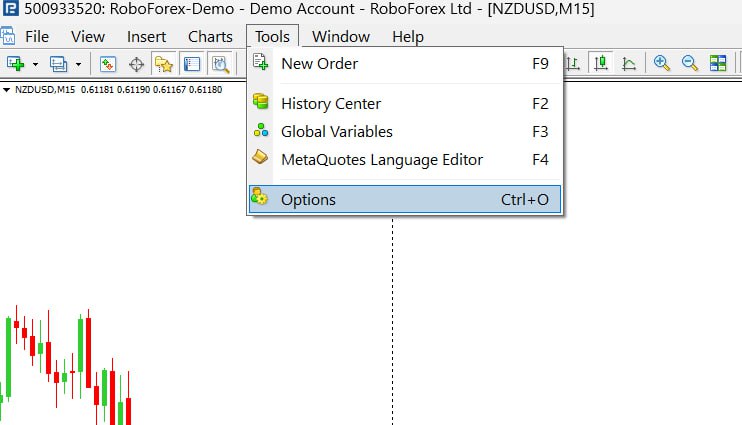
1.First enter the Options section in the tools.
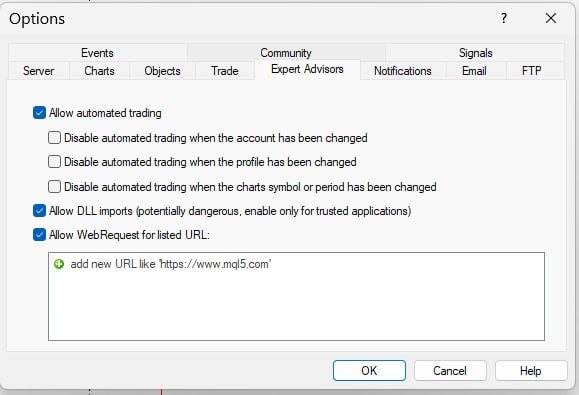
2.Then, in the Expert Advisors tab, apply the settings as shown in the image
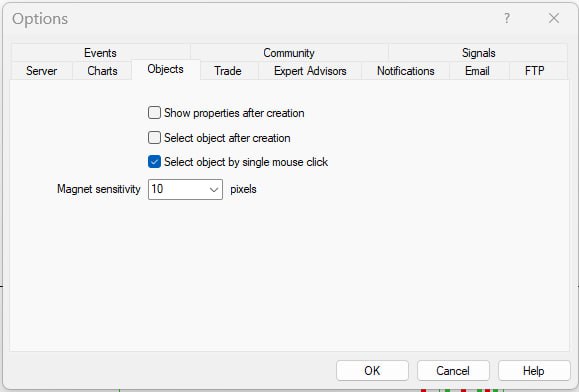
3.Also, in the Objects tab, activate the last option, then press OK to save the settings.
4.After downloading and saving the program on your computer, move the saved file to the Expert folder in your MetaTrader directory.
5.Refresh the Expert menu to make the desired expert visible in the Experts menu, and run the program.
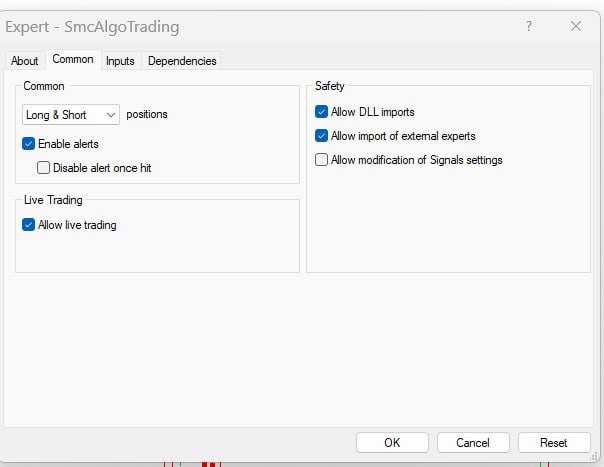
6.Enter the Common tab when starting the program and apply the settings according to the image. Save the settings by clicking the OK button.
Please test the program on a demo account first, After becoming familiar with how the program works and if satisfied, you can use it on your live trading account.
Look closely at this image and the data on each manager. By clicking on each active manager, you can set orders by pressing the ‘Set Order’ key with the specifications on the manager order.
Before the order is set, it specifies the exact target, stop, commission, and risk-to-reward ratio.